Compatible with Chrome and Edge
Instruction Guide
We have a simple tutorial guide which explains the features of the software extension and what each button inside the extension does. Read our tutorial and welcome guide on how to use the extension to the fullest. Use all the features of this browser software.
If you are interested in other web extensions to install, you might wish to check out the Microsoft Bing Search with Rewards extension.
Microsoft Bing Search with Rewards Extension
It allows you to complete daily offers to get points.
Track the number of points you have currently and the rewards you can redeem with these points.
The ways to get points & get rewarded is search with Bing, browse with Microsoft Edge and shop at the Microsoft and Windows stores to earn rewards.
Sponsored Link:
Other useful extensions
Another extension which would be useful to install is the iCloud bookmarks extension.
It allows to keep your Chrome bookmarks on Windows synced up with the Safari bookmarks on your iPhone, iPad, and Mac.
iCloud will store your website bookmarks so it is accessible even on your iPhone and Mac.
Try these other two extensions and see if it will boost your daily productivity.
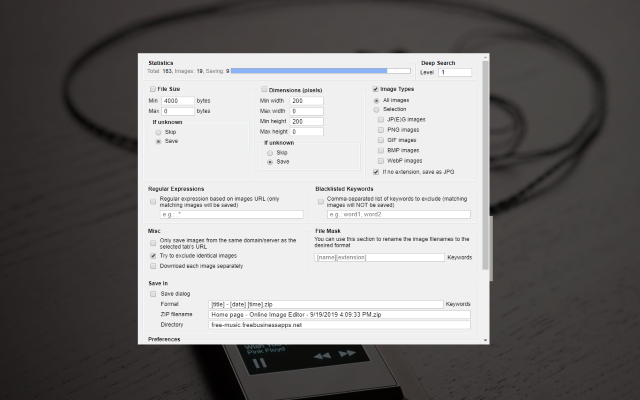
When you visit a favorite website, or a site you visit every day, you see images that make you want to download to your computer. If downloading each image takes your time and effort, so use our extensions, we will save you time with just one click.
Features:
Install and open.
- After installing the extension. You can use the context menu and right click to save to your Google Photos account.
Google Photos is a photo and video backup and sharing app. It also offers a wide range of editing tools, including filters, frames and stickers.
Google Photos is a free app available on Android and iOS devices, as well as on the web at photos.google.com.
Google Photos automatically backs up your photos and videos so you can access them from any device. The app also lets you organize, search for and share your photos and videos with friends and family.
You can use Google Photos to:
Import photos from your camera roll or SD card into Google Photos
Back up unlimited original-quality photos & videos at no additional cost
Store photos & videos online for free, up to 16 megapixels & 1080p HD for free for life — no need to worry about running out of storage
Share all of your albums with anyone
What are the benefits to using Google Photos?
Google Photos offers several features that make it easy to store, organize and share your photos. Here are some of the benefits:
Free unlimited storage for all your photos, videos and backup files in full resolution.
All of your photos and videos are stored securely with Google. You can also back up photos and videos from your Android phone or tablet.
Automatic organization by date and location, so you can find any photo quickly.
Sharing with friends and family is fast and easy with built-in tools like text messaging and emailing. You can also easily share your photos on Facebook, Twitter or other social networks, as well as through email or SMS.
Tutorial:
- Install the Extension
- After installing the extension, click on the icon on the toolbar.
Sponsored Link: